Why Everyone is Buying the Scimitar Pro Rgb (Full Review)
After spending nearly a decade in the world of Azeroth and various other digital realms, I have realized that the most important piece of gear in my setup isn't my graphics card or my high-refresh-rate monitor—it is my mouse. If you play MMOs (Massively Multiplayer Online games) or MOBA titles, you know that your right hand is essentially the controller for a complex industrial machine. For years, I struggled with standard five-button mice, trying to map three rows of ability bars to my keyboard while my thumb sat idle, doing absolutely nothing except providing grip. That changed when I finally picked up the Scimitar Pro RGB. I have been using this mouse for over six months now as my daily driver for both hardcore raiding and professional productivity work, and the experience has been a revelation, though not without its specific quirks and minor frustrations.
The MMO Mouse Realization
I remember the first night I plugged this mouse in. I had just come from a standard ergonomic mouse, and the sheer weight of the Scimitar Pro was the first thing I noticed. It felt substantial, like a tool rather than a toy. What drew me to this specific model over its competitors—like the Razer Naga or the Logitech G600—was the "Key Slider" system. I have relatively large hands, and one thing that always bothered me about fixed-grid side buttons is that I’d have to cramp my thumb backward to hit the rear buttons. Being able to physically slide the entire 12-button panel forward or backward meant I could finally align the center of the grid exactly where my thumb naturally rests.
In my experience, the first week was a brutal learning curve. I was misclicking "1" when I meant "4," and I accidentally triggered my ultimate ability more than once during simple movement phases. But after about ten days of muscle memory development, something clicked. I found that I was no longer looking at my keyboard to find the '7', '8', and '9' keys. My left hand was freed up almost entirely for movement (WASD) and modifiers (Shift/Ctrl), while my right thumb took over the rotation. This shift didn't just make me a better player; it actually reduced the strain on my left wrist, which used to ache after long sessions of stretching for distant keys.
Design and Ergonomic Deep Dive
What I found was that the Scimitar Pro RGB is designed with a very specific grip style in mind. It is a wide mouse. It features a ring-finger rest on the right side with a textured rubber grip. If you are a "palm" gripper like me, this feels like luxury. Your entire hand is supported. However, I noticed that if you prefer a "fingertip" or "claw" grip, this mouse might feel cumbersome and overly heavy. It lacks the nimble flick-ability of a lightweight shooter mouse, but that’s because it isn't trying to be one. It’s a tank, designed for stability and a high volume of inputs.
The 12-button side panel is the star of the show, and Corsair did something clever here: they alternated the texture of the buttons. Columns one and three are textured, while columns two and four are smooth. This subtle tactile feedback was essential for me. I could feel exactly where I was on the grid without having to look down. Each button has a mechanical click to it—not as loud as a keyboard, but enough of a snap to let you know the command was registered. I was surprised by how much I appreciated the stiffness of these buttons. They require just enough pressure that I haven't had issues with accidental presses when picking the mouse up to reposition it on my pad.
The Key Slider System: A Real-World Benefit
One thing that bothered me about my previous MMO mice was the "reach." If the side buttons are too far forward, you lose your grip stability; if they are too far back, you get thumb cramps. The Scimitar Pro carries a small hex key (which is included in the box) that allows you to loosen a screw on the bottom and slide the side panel 8mm along a rail. After testing for a few hours, I settled on a middle-rear position. This allowed my thumb tip to hover over the '5' key, giving me instant access to the entire 12-button spread with minimal movement. It is a level of customization that I honestly didn't think I needed until I had it, and now I can't imagine going back to a fixed layout.
Performance and Sensor Accuracy
Under the hood, this mouse uses a custom PMW3367 optical sensor, developed with PixArt. It goes up to 16,000 DPI. To be honest, I never go above 2,400 DPI, but the accuracy at lower ranges is impeccable. I’ve used this on cloth pads, hard plastic pads, and even my bare wooden desk—the tracking stayed consistent across all of them. In my experience, the lift-off distance is also very manageable. You can calibrate the sensor to your specific surface using the Corsair iCUE software, which I found actually improved the "feel" of the cursor movement on my high-friction cloth mat.
Discover deals on Electronics — updated daily.
See Deals →I noticed that the mouse feet (the PTFE pads) are quite large. This contributes to a very smooth glide despite the heavy weight of the unit. However, I should mention a minor disappointment: because the mouse is so wide, it can sometimes feel like it's dragging more than a slimmer mouse would. You need a decent amount of desk space to really let this thing move. If you have a tiny mousepad, you’re going to find yourself hitting the edges frequently because of the Scimitar's footprint.
Software and Customization (iCUE)
We need to talk about the software, because you cannot use this mouse to its full potential without it. I have a love-hate relationship with iCUE. On one hand, the depth of customization is staggering. I’ve set up profiles that automatically switch depending on whether I have WoW, Premiere Pro, or Excel open. Yes, I use the 12-button grid for video editing and spreadsheet macros. Mapping "Copy," "Paste," "Cut," and "Undo" to the side buttons has genuinely boosted my productivity more than it has my gaming performance.
However, I was frustrated by the complexity of the macro recording system. It isn't exactly intuitive. It took me a solid hour to figure out how to save a hardware profile directly to the mouse's onboard memory so that I wouldn't have to keep iCUE running in the background all the time. If you don't save to the hardware profile, the RGB lighting often reverts to a default "rainbow" mode the second you lock your computer, which can be annoying if you’ve spent a lot of time color-coordinating your desk. The software is powerful, but it definitely feels like it was designed by engineers for engineers.
Daily Reliability and Durability
After six months of heavy daily use, the Scimitar Pro RGB has held up remarkably well, but I have noticed one small area of wear. The textured rubber on the ring-finger rest has started to collect a bit of "desk gunk" and requires regular cleaning with a damp cloth to maintain its grip. The main left and right click buttons still feel as crisp as day one. I haven't experienced any of the "double-clicking" issues that seem to plague many modern gaming mice these days. The braided cable is also high quality—it's flexible enough that it doesn't push the mouse back when I let go, but it feels tough enough to survive being caught in a drawer or chewed by a pet (though I haven't tested the latter).
Pros and Cons
- Unmatched Customization: The sliding side panel is a game-changer for ergonomics, accommodating almost any hand size for a palm grip.
- Tactile Feedback: The mechanical side buttons feel great and the alternating textures make "blind" navigation of the 12-button grid very easy.
- Onboard Storage: Being able to save three profiles directly to the mouse means you don't always need the heavy iCUE software running.
- Versatility: While marketed for MMOs, it is an incredible tool for productivity, video editing, and CAD work.
- Build Quality: The aluminum frame and high-quality plastics make it feel like a premium, durable piece of hardware.
- Weight and Size: It is very heavy and very wide. This is not a mouse for competitive FPS players or those who prefer a lightweight feel.
- Software Learning Curve: Corsair iCUE is powerful but can be extremely overwhelming and occasionally buggy for new users.
- Cleaning: The textured side grips and the gaps around the slider tend to trap dust and skin oils more than a smooth-surfaced mouse would.
- Niche Grip: Almost exclusively designed for palm grippers; claw and fingertip grippers will likely find the shape awkward.
Comparison with Competitors
In my journey to find the perfect mouse, I compared the Scimitar Pro against the industry standards. Here is how it stacks up in my findings.
| Feature | Corsair Scimitar Pro RGB | Razer Naga Trinity | Logitech G600 |
|---|---|---|---|
| Side Buttons | 12 (Adjustable Slider) | Interchangeable Panels (2, 7, 12) | 12 (Fixed Grid) |
| Sensor | 16,000 DPI Optical | 16,000 DPI Optical | 8,200 DPI Laser |
| Weight | 147g (Very Heavy) | 120g (Medium) | 133g (Heavy) |
| Special Feature | Key Slider (Physical adjustment) | Swappable side plates | G-Shift third main button |
| Best For | Ergonomic customization | Multi-genre gaming | Budget-conscious MMO players |
Buying Guide: Is This Mouse for You?
Before you commit to the Scimitar Pro RGB, you need to evaluate your gaming and working style. I've found that this mouse is a "specialist" tool. If you are someone who plays a variety of games—switching from Call of Duty to World of Warcraft to League of Legends—you might find the Scimitar a bit cumbersome for the fast-twitch requirements of shooters. However, if you spend 80% of your time in games that require more than ten keybinds, this mouse is effectively mandatory.
Looking for the best Electronics deals on Amazon?
Shop Amazon →Consider your hand size first. If your hands are on the smaller side, even with the slider pushed all the way back, you might find the width of the mouse a bit taxing for your pinky finger. You should also consider your tolerance for mouse weight. Modern trends are moving toward "ultra-light" mice (often under 70g), and the Scimitar Pro is more than double that weight. It provides a "planted" feel, which is excellent for precise cursor movements in a UI, but it requires more effort to move quickly across a 4K screen.
Lastly, think about your setup. Do you have other Corsair peripherals? If you already have a Corsair keyboard or headset, the iCUE integration becomes much more valuable as you can sync your lighting and profiles across the whole ecosystem. If you are coming from a different brand, be prepared to spend an evening setting up your macros and getting used to a new interface.
Final Thoughts and Conclusion
After months of testing, I can confidently say that the Scimitar Pro RGB has earned its permanent spot on my desk. I started out looking for a way to hit my "Heal" and "Shield" buttons faster in raids, but I ended up with a device that changed how I interact with my computer entirely. The ability to move the side buttons to fit my thumb rather than forcing my thumb to fit the mouse is a design choice that more manufacturers should adopt.
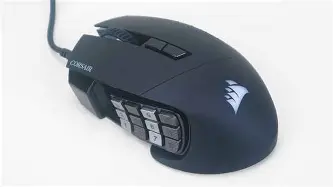
There are certainly things that could be improved. I would love to see a slightly lighter version in the future, and I think the software could be made much more user-friendly for the average gamer. I also noticed that the RGB, while beautiful, is mostly covered by your hand while you are using the mouse, making it somewhat irrelevant during gameplay. But these are minor gripes when compared to the utility the mouse provides. For the MMO player who wants comfort, a massive amount of inputs, and high-end sensor performance, there really isn't anything else on the market that offers this specific combination of features. It isn't just a gaming mouse; it's a productivity powerhouse that happens to be great at slaying dragons.
If you have been struggling with keybind bloat or if you find yourself fumbling for keys in high-pressure moments, this is likely the solution. It took me some time to adjust, and I had to overcome a few software hurdles, but the result was a more comfortable and efficient gaming experience. It’s hard to imagine going back to a standard mouse now—my thumb would simply have too much free time on its hands.